What Is System Prompt Anatomy?
Think of a system prompt as the combination of a job description and an employee handbook for an LLM. The job description tells the model what role it plays, what it is responsible for, and what its goals are. The employee handbook specifies rules, procedures, acceptable behaviors, and how to handle edge cases. Together, they create the operational context that shapes every subsequent response. Just as a new hire reads these documents before starting work, the LLM processes the system prompt before handling any user input.
System prompts are the most persistent and influential piece of text in any LLM application. Unlike user messages that change with each turn, the system prompt is injected at the beginning of every conversation and (in well-designed systems) reinforced throughout. The quality of a system prompt directly determines the quality, consistency, and safety of the application's outputs. A poorly structured system prompt produces inconsistent behavior, frequent instruction violations, and outputs that drift from the intended purpose.
Despite their importance, system prompts are often written ad hoc -- a paragraph of loosely organized instructions that grows by accretion as problems are discovered. Understanding the anatomy of a system prompt transforms this process from art to engineering, providing a repeatable framework for building reliable, high-quality prompts.
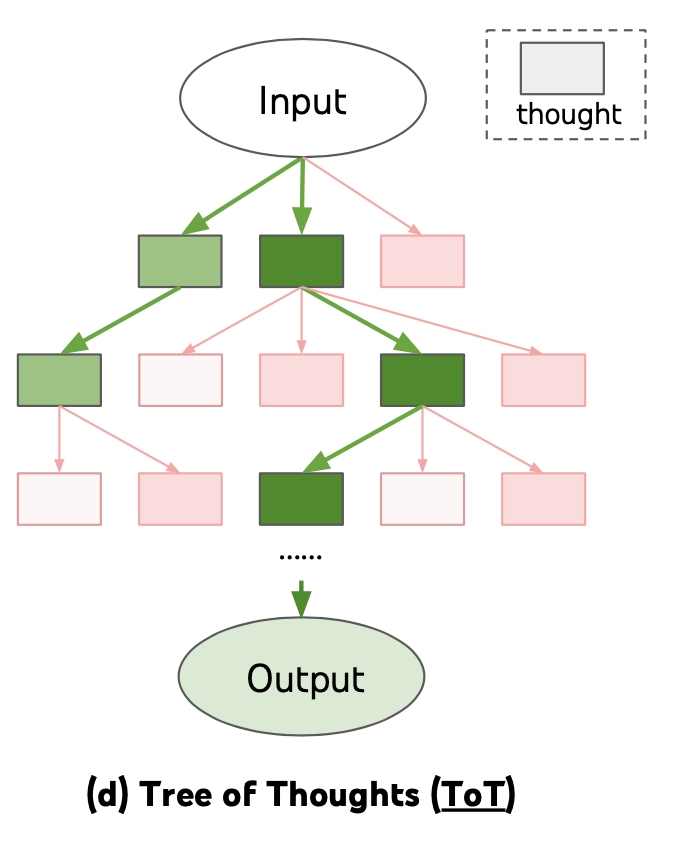 Source: Lilian Weng, "Prompt Engineering," lilianweng.github.io (2023)
Source: Adapted from Anthropic and OpenAI system prompt best practices documentation (2024)
How It Works
Component 1: Role Definition
The role definition establishes the model's identity, expertise, and perspective. It answers the question: "Who are you in this conversation?"
A strong role definition includes the persona ("You are a senior tax accountant"), the domain expertise ("with 15 years of experience in corporate tax law"), and the communication style ("you explain complex topics clearly and concisely"). Role definitions prime the model's generation toward domain-appropriate vocabulary, reasoning patterns, and judgment calls.
Research shows that role prompting improves domain-specific accuracy by 5-15% compared to generic prompting.
Component 2: Context
The context section provides the situational information the model needs to generate appropriate responses. This includes: the application's purpose, the target audience, the current date/time if relevant, organization-specific knowledge, and any dynamic information injected at runtime. Context should be placed in the middle section of the system prompt, where it serves as reference material rather than high-priority instructions. Effective context is specific ("Our product is a B2B SaaS platform for healthcare scheduling") rather than vague ("We are a technology company").
Component 3: Behavioral Constraints
Behavioral constraints define the model's rules of engagement: what it must do, what it must not do, and how it should handle specific situations. These are the most critical instructions and should be positioned at the top and bottom of the system prompt (see ordering principles below). Constraints should be specific, positive when possible, and formatted as numbered lists for maximum adherence. Examples: "Always cite the source document when providing information," "If the user asks about competitors, redirect to our product features," "Never provide medical diagnoses."
Component 4: Tool Instructions
When the model has access to tools (search, code execution, APIs), the system prompt must specify when and how to use them. This includes: which tools are available, when each tool should be used, the expected input/output format, error handling behavior, and any tool-use constraints. Tool instructions should be explicit about decision criteria: "Use the search tool when the user asks about events after January 2024" is more reliable than "Use search when needed."
Component 5: Output Format
The output format section specifies the structure, style, and formatting of responses. This includes: response length guidelines, formatting requirements (markdown, JSON, plain text), tone and register, whether to use headers and bullet points, and any domain-specific formatting conventions.
Output format instructions are highly effective -- models follow explicit formatting instructions with 85-95% compliance when clearly specified. Format instructions work best when they include a concrete example of the desired output structure.
Component 6: Examples
Embedding 1-3 examples of ideal interactions in the system prompt dramatically improves output quality and consistency. Examples serve as concrete demonstrations of how all other components work together. They show the model the desired reasoning pattern, output format, tone, and constraint adherence in action. Examples are particularly effective for establishing subtle stylistic requirements that are difficult to describe in abstract instructions.
Why It Matters
Consistency Across Conversations
A well-structured system prompt produces consistent behavior across thousands of conversations. Without it, the model's behavior varies based on how the user frames their request, leading to an unpredictable user experience. The system prompt is the primary mechanism for application-level consistency.
Defense in Depth
Each component of the system prompt serves as a layer of defense. Role definition prevents the model from acting outside its intended scope. Behavioral constraints prevent harmful or off-brand outputs. Output format ensures usability. Together, they create multiple overlapping controls that make failures less likely and less severe.
Maintainability and Iteration
When system prompts are organized into clearly labeled components, they become maintainable. Teams can update the context without touching the constraints, modify the output format without affecting the role definition, and add tool instructions without disrupting existing behavior. This modularity enables rapid iteration and systematic A/B testing.
Onboarding and Knowledge Transfer
A well-structured system prompt serves as documentation of the application's intended behavior. New team members can read the system prompt and understand the application's role, constraints, and expected outputs without extensive onboarding. This self-documenting property is particularly valuable in fast-moving teams where multiple people may need to modify prompts.
Key Technical Details
- Token budget: System prompts should typically consume 10-20% of the total context window. For a 128K-token window, that means 12,800-25,600 tokens. Exceeding this leaves insufficient room for conversation history and user input.
- Ordering principle: Critical rules should be placed at the top (primacy effect) and bottom (recency effect) of the system prompt. Context and reference material should be placed in the middle.
- Numbered lists vs. prose: Behavioral constraints formatted as numbered lists show 15-20% better compliance than the same rules written in prose paragraphs.
- Example count: 1-3 embedded examples are optimal. More than 3 examples consume excessive tokens with diminishing returns on behavior shaping.
- Role definition impact: Specific role definitions improve domain accuracy by 5-15% compared to generic "You are a helpful assistant" prompts.
- Format compliance: Explicit output format instructions (with examples) achieve 85-95% compliance with modern instruction-tuned models.
- Reinforcement: For conversations exceeding 20 turns, critical instructions should be reinforced (re-injected) to combat instruction decay.
- Component interaction: Components can reinforce or conflict with each other. A role definition that says "be concise" combined with an output format that requires detailed explanations creates a tension. Components should be reviewed as a whole, not just individually.
- Provider differences: Different model providers handle system prompts differently. Anthropic uses a dedicated system parameter. OpenAI uses a "system" role message. The behavioral effect is similar, but implementation details (token billing, caching) vary.
Common Misconceptions
-
"A longer system prompt is always better." Beyond a certain point, additional system prompt length causes instruction competition (rules fighting for attention) and context window pressure (less room for the actual conversation). Concise, well-organized prompts outperform verbose ones.
-
"The system prompt is just a 'personality description.'" Role definition is only one of six components. A production system prompt must also address constraints, tools, formatting, and context. Treating the system prompt as merely a personality description produces unreliable applications.
-
"System prompts are immutable once deployed." Production system prompts should be versioned, tested, and iterated like any other code artifact. Static system prompts accumulate technical debt as the application evolves and edge cases are discovered.
-
"The order of instructions doesn't matter." Instruction position significantly affects compliance. Instructions at the beginning and end of the system prompt receive more attention (due to primacy and recency effects in the model's attention mechanism) than instructions buried in the middle.
-
"Examples in the system prompt waste tokens." Examples are among the most token-efficient components because they simultaneously demonstrate role, constraints, formatting, and reasoning patterns. A single well-chosen example can replace hundreds of words of abstract instruction.
Connections to Other Concepts
- Behavioral Constraints and Rules -- Deep dive into the constraint component, including framing, specificity, and conditional logic.
- Instruction Hierarchy Design -- How the system prompt relates to other instruction sources (developer, user, tool) and why hierarchy matters.
- Instruction Following and Compliance -- Why some system prompt instructions are followed and others ignored, and how to maximize adherence.
- Dynamic System Prompts -- Runtime assembly of system prompt components, enabling personalization and feature-flagged behavior.
- Context Window Mechanics -- Understanding the token budget constraints that limit system prompt length and inform allocation decisions.
Further Reading
- Anthropic. (2024). "Anthropic's Prompt Engineering Guide." Anthropic Documentation. Comprehensive guidance on system prompt construction for Claude models, including component ordering and best practices.
- OpenAI. (2024). "Best Practices for Prompt Engineering." OpenAI Documentation. Practical recommendations for structuring system prompts, with emphasis on constraint specification and output formatting.
- Zamfirescu-Pereira, J. D., Wong, R. Y., Hartmann, B., & Yang, Q. (2023). "Why Johnny Can't Prompt: How Non-AI Experts Try (and Fail) to Design LLM Prompts." CHI 2023. Research on common prompt design failures, motivating the need for structured system prompt methodology.
- White, J., Fu, Q., Hays, S., et al. (2023). "A Prompt Pattern Catalog to Enhance Prompt Engineering with ChatGPT." Identifies reusable prompt patterns, several of which map directly to system prompt components.